PaintYourFriends
Beginner guide

How to Play Paint your Friends (Roblox) — August 2026 Guide

From zero to a finished painting in four moves. This is the whole core loop: plot, avatar, blocks, save.

Quick answer

This numbered beginner guide has four numbered steps: claim a plot, load an avatar, paint block by block, and let auto-save keep your work. How color-by-number works here: every number is one color — and it is different from the legacy Color by Number game. Join the game, claim a plot, load an avatar (yourself, a friend, or a celebrity), then fill the numbered blocks until the picture is done. Your work saves automatically, and servers hold up to 8 players painting side by side. Game data checked 2026-08-03.
The path

Four moves to a finished painting

1

Join and claim a plot

Open the game from the official Roblox page and pick a free plot in the server — that plot is your personal canvas space. Up to 8 players share a server, each on their own plot.

We're still confirming the exact plot-claiming button placement in-game.

2

Load an avatar onto your canvas

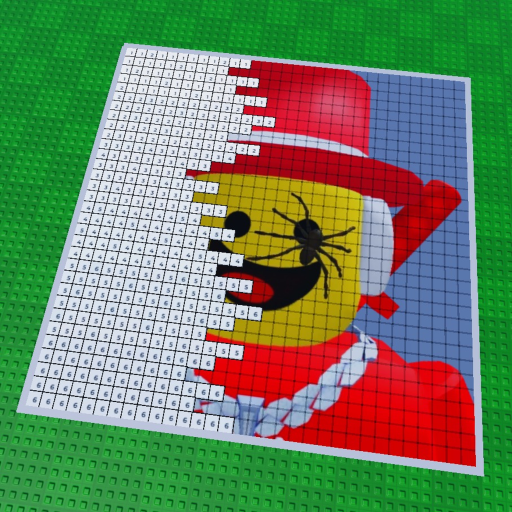
Use the avatar loader on your plot to pick what you will paint: yourself, a friend, or a celebrity icon. The loaded image appears as a numbered template.

We're still confirming whether any username works or only Roblox friends.

3

Paint block by block

The canvas is color-by-number: every numbered block matches one color. Fill blocks until the picture is complete — that's all there is to the core loop.

4

Leave whenever — it saves

Your painting saves automatically, so you can leave mid-canvas and continue later. The game says so in its own description.

Save slots and limits are unknown for now.

If you get stuck

  • No canvas anywhere? You need to claim a plot before a canvas appears — look for a free plot spot in the server.
  • Painting gone after leaving? It should not be — paintings auto-save. Rejoin and check your own plot first.
  • Blocks do not make sense? Each number maps to exactly one color. Match the number, not the picture you imagine.

Common first-session mistakes

  • Searching for codes first: There are no codes in this game. Sites listing 'paint codes' are about Spray Paint or Paint and Seek — different games.
  • Leaving because you think progress is lost: Paintings auto-save. Rejoin and check your plot before starting over.
  • Painting alone when friends are online: Servers fit 8 players and painting side by side is half the fun — invite a friend and paint each other.
FAQ

How to play — common questions

How do I start painting in Paint your Friends?

Join a server, claim a plot, load an avatar icon, and fill the numbered blocks with their matching colors.

How does color-by-number work here?

The canvas is a numbered grid; every number corresponds to one color, and filling all blocks completes the picture. It is also different from the legacy Color by Number game.

Do my paintings save?

Yes — the game says paintings save automatically (checked 2026-08-03). Save limits are not known yet.

How many players are in a server?

Up to 8 players per server, all painting in real time on adjacent plots.

Is Paint your Friends free?

Yes, it is free to play on Roblox.

Next

Ready for the fun part?